AIDataExtraction:TurnWebsitesintoStructuredTables
AI Data Extraction: Turn Websites into Structured Tables
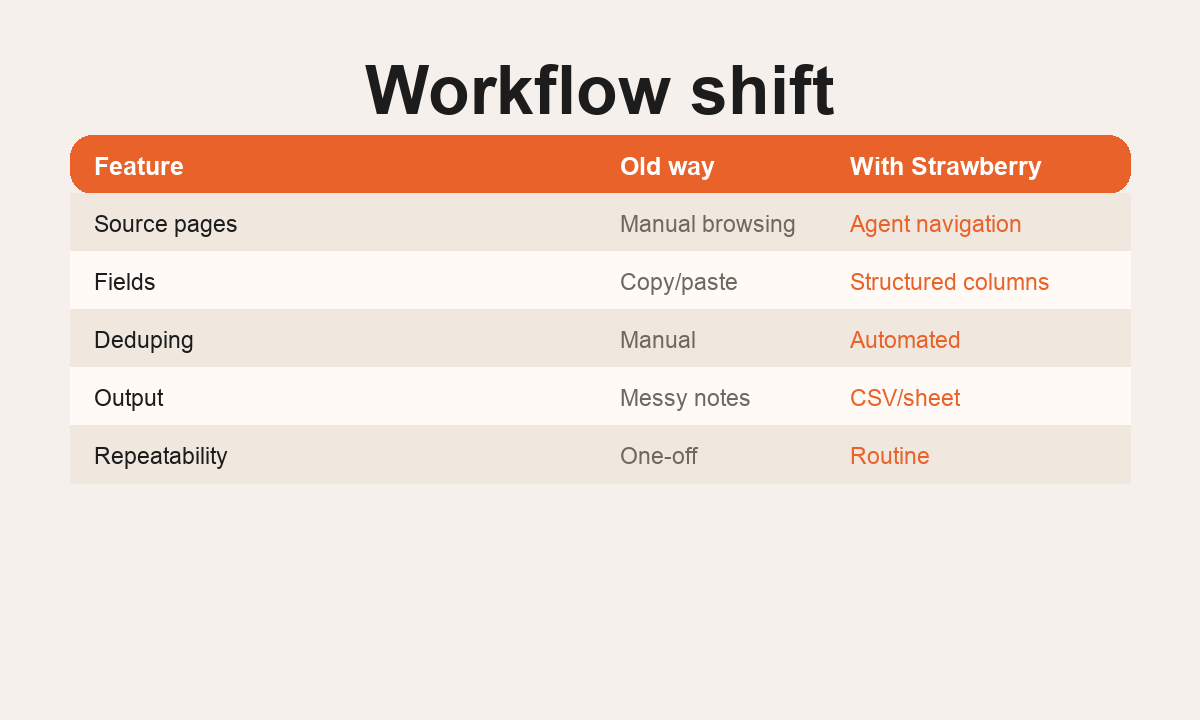
AI data extraction is the process of turning messy web pages, directories, PDFs, search results, and logged-in tools into structured data you can actually use. The output might be a CSV, a Google Sheet, a CRM import, a research table, or a report.
Traditional scraping works well when pages are predictable and the fields never change. Real business extraction is messier. Pages have different layouts, useful details are hidden behind clicks, some sources require login, and the data often needs judgment before it becomes useful.
That is where browser agents help. Strawberry Browser can read pages like a person, use connected apps, extract the fields you need, and save the result as a structured file.
What AI data extraction is used for
Teams use AI data extraction when the source is valuable but not already available as a clean API.
Common examples include:
- Building lead lists from directories, job boards, event pages, and company websites.
- Extracting contacts, roles, locations, pricing, product categories, or proof points.
- Turning competitor pages into comparison tables.
- Pulling company data from search results and public registries.
- Creating recruiting shortlists from public profiles and role pages.
- Summarizing PDFs, reports, and policy documents into tables.
- Monitoring websites for changes and writing the result into a tracker.
For related workflows, see AI for research, AI for sales, AI for recruiting, and AI agents for work.
Why browser-based extraction matters
Many extraction tasks do not live inside neat APIs. The useful data is often spread across websites, search result pages, embedded tables, files, and logged-in tools. A browser agent can work with those environments because it uses the browser itself.
That matters in practical workflows. If you are researching agencies, the contact page might use one layout, the services page another, and the founders might only appear on LinkedIn. If you are building a market map, some companies list pricing publicly, some hide it in docs, and some only reveal useful details in case studies.
A browser agent can read, compare, and normalize these differences instead of failing because one selector changed.
A good extraction workflow
The best extraction tasks start with a clear schema. Before collecting anything, define the columns you want.
For a sales lead list, the schema might be:
- Company name.
- Website.
- Country.
- Industry.
- Relevant trigger.
- Decision maker.
- Email source.
- Fit score.
- Suggested opening angle.
For a competitor table, the schema might be:
- Product.
- Target customer.
- Main claim.
- Pricing model.
- Integrations.
- Strengths.
- Weaknesses.
- Source URL.
Once the schema is clear, the agent can search, browse, extract, validate, and write rows. The final result should be easy to inspect and import into another system.
What AI should validate
Extraction is not only copying text. Good data extraction includes validation.
A useful agent should check whether fields are supported by a source, avoid guessed emails, flag uncertainty, and separate direct facts from inferred notes. If a company website does not list a role or email, the output should say that instead of hallucinating.
For commercial workflows, this matters. Bad data creates bounced emails, irrelevant outreach, and messy CRMs. Good extraction should make the next step safer, not just faster.
Example: directory to CRM
Imagine you want to find 50 agencies in a region that are hiring for performance marketing roles. A Strawberry companion can search job boards, open company sites, extract decision makers, verify domains, produce a CSV, and prepare CRM records.
That is more useful than a generic scrape because the agent can add context: what the company does, why the timing matters, and what outreach angle fits the trigger.
Example: website to report
An agency can use the same workflow for client reporting. The agent can collect competitor pages, search visibility signals, ad examples, website changes, and campaign notes, then write a weekly summary with source links.
Instead of manually copying screenshots and notes into a slide, the team gets a structured report that can be reused every week.
When not to use AI extraction
Do not use AI extraction for private data you do not have permission to access, high-risk regulated decisions without human review, or large-scale scraping that violates website rules. Also avoid unclear prompts like "scrape this site" without defining the fields and purpose.
The right instruction is specific: "Extract company name, website, country, target customer, proof point, and source URL from these 25 pages. Write a CSV and flag low-confidence rows."
The bottom line
AI data extraction is valuable when it produces clean, usable outputs from messy sources. Strawberry is built for that work because it combines browser access, app connections, files, memory, and repeatable skills.
The result is not just scraped text. It is structured operating data your team can use in sales, research, recruiting, marketing, and operations.
Workflow pattern
1. Define
Set the goal, source list, fields, and success criteria before the agent starts.
2. Gather
Use browser access, web search, connected apps, and files to collect the right evidence.
3. Structure
Turn messy source material into a brief, table, CSV, CRM note, or repeatable output.
4. Reuse
Save the workflow as a skill or routine so the next run gets faster and more consistent.
How to run this in Strawberry
Start with the output
Tell your companion what final file, table, report, or app update you want.
Name trusted sources
List the websites, apps, folders, tabs, or search angles the agent should check first.
Add guardrails
Decide what the agent can do autonomously and what requires approval.
Save the workflow
When the result is good, turn it into a reusable skill or scheduled routine.
No. A chatbot mainly answers inside a conversation. A browser agent can work across websites, tabs, connected apps, files, and repeatable workflows.