AI for Sales: From Lead Research to Meetings
Use AI browser agents to automate sales research, lead sourcing, personalized outreach, CRM updates, and meeting preparation.
AI for Sales: From Lead Research to Meetings
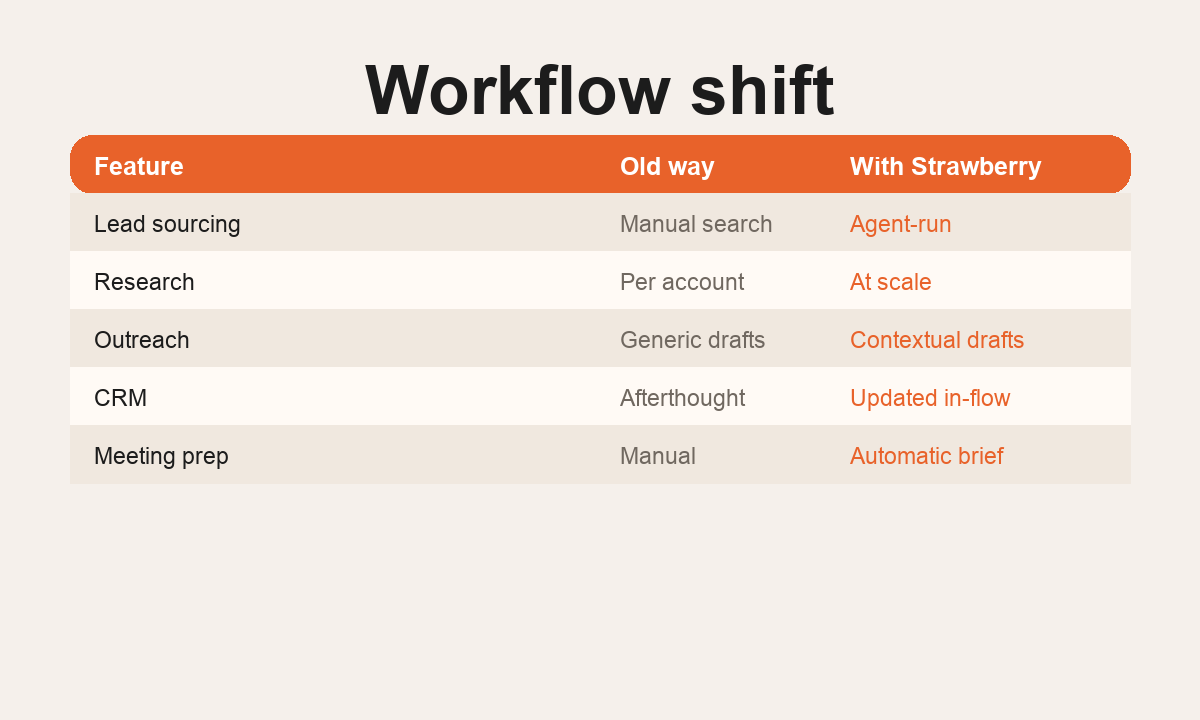
AI for sales is most useful when it does more than write a cold email. The real leverage is connecting the entire sales workflow: account research, trigger detection, contact discovery, enrichment, personalized outreach, CRM updates, call tasks, and meeting preparation.
Most teams already have enough sales tools. The problem is that the work is split across too many surfaces. A rep researches a company in the browser, checks LinkedIn, copies notes into the CRM, looks for a relevant trigger, writes an email, checks the calendar, and then repeats the same process for the next account. AI becomes valuable when it compresses that whole path into one repeatable workflow.
Strawberry is built for this kind of sales work because it sits in the browser and can also use connected apps. The public Strawberry site describes sales workflows around sourcing leads, updating CRM systems, drafting outreach, and working with tools such as LinkedIn, Salesforce, Gmail, and Apollo. That does not replace the rep. It gives the rep a faster way to turn messy web research into a reviewed output.
Where AI helps in the sales workflow
The strongest sales use cases are specific operational jobs that happen every week. A good AI sales workflow can build a target account list from a market, job board, event, directory, or competitor ecosystem; research each account for recent triggers; find the most relevant buyer persona; enrich a row in a CRM or spreadsheet; draft outreach that references a real business reason; prepare a meeting brief from the website, prior email thread, CRM notes, and calendar event; and create follow-up tasks after a call.
The key is evidence. The workflow should show where each claim came from, what is uncertain, and what the rep should review before sending anything external. A useful output has source URLs, confidence, missing data, and a next action. Without those fields, AI sales work turns into a volume machine instead of a pipeline-quality machine.
A practical Strawberry sales workflow
Find 25 Nordic B2B agencies that have recently hired sales or marketing roles. For each one, capture website, buyer contact, trigger, why Strawberry is relevant, confidence, and next action. Put the output in a table and mark anything uncertain.
The companion can research the web, inspect pages, use connected tools, and return a structured list. The next step might be a reviewed outreach draft, a CRM note, or a calendar prep brief. Sensitive actions such as sending email should stay human-approved.
What to automate first
Start with work that is repetitive, research-heavy, and easy to review. The best first workflows are account research, trigger monitoring, CRM hygiene, meeting prep, and follow-up drafts. These are high-leverage because a human can quickly inspect the output and spot mistakes before anything reaches a prospect.
Avoid automating judgment too early. The rep should still choose the target, approve the message, and decide when to push. Strawberry can reduce the admin around that decision, but the decision itself should stay with the team.
What good output looks like
A useful sales agent output is not a paragraph of generic advice. It is a working asset: a CSV with accounts, contacts, triggers, source links, confidence, and next action; CRM notes with concise evidence and ownership; a meeting brief with discovery questions and a tailored demo path; a draft email that references a verified trigger; or a daily routine that flags new opportunities instead of creating noise.
The output should also make review easy. Put uncertain rows at the bottom. Separate verified facts from assumptions. Keep the message draft in a separate field. Add a final review checklist before any send.
How to measure it
Measure time saved, qualified accounts found, meetings booked, CRM records cleaned, and reply quality. Do not judge the workflow by raw email volume. A good AI sales workflow should improve the quality and speed of research while keeping the team in control of external communication.
Why browser-native matters
Sales work starts in the open web and logged-in tools. A normal chatbot can help write copy after the fact, but it does not naturally see the page, tab, CRM, inbox, and calendar context where the work lives. A browser agent is better suited when the task requires moving across those surfaces, gathering context, and producing an output that can be checked.
Related Strawberry workflows
If this page is relevant, also read Browser Agents for Sales Teams, AI for CRM Hygiene, AI for Meeting Prep, and AI for Data Extraction.
FAQ
Can AI fully replace a sales rep? No. The best use is removing repetitive research and admin so the rep can spend more time on judgment, timing, and conversations.
Should AI send outbound automatically? For most teams, no. Use AI to research, structure, and draft. Keep final review and sending human-approved.
What should I try first? Start with one narrow workflow: account research into a spreadsheet, CRM cleanup, or meeting prep for next week's calls.
Common mistakes to avoid
The easiest mistake is asking AI to create outreach before it has done the research. That usually creates generic emails with weak proof. A better workflow starts with account evidence, then turns that evidence into a draft. Another mistake is scaling before reviewing a sample. Sales data gets messy quickly: duplicate companies, stale job posts, uncertain titles, and generic email patterns can all pollute a list. Review the first 10 rows, fix the prompt, then scale.
Do not let the workflow hide uncertainty. If a buyer contact is guessed, mark it as guessed. If the trigger is old, mark the date. If the company is a poor fit, exclude it. The best sales agents are useful because they make judgment easier, not because they pretend everything is certain.
When this workflow is ready to scale
Scale when the sample has clear fit, clean source links, low duplication, and drafts that sound like a human would actually send them. At that point, the same workflow can become a routine: scan a market every week, flag new triggers, prepare account briefs, and leave the rep with a short queue of reviewed next actions.
AI sales workflow map
Market input
A segment, event list, job board, CRM view, or competitor ecosystem.
Browser research
Company pages, LinkedIn, hiring signals, news, and source links.
Structured output
CSV, CRM note, account brief, or meeting prep document.
Human review
Rep approves targeting, message, and any external send.
Start with a safe sales agent workflow
Pick one segment
Choose a narrow market where triggers and buyer personas are easy to verify.
Request evidence columns
Ask for source URL, confidence, missing data, and next action in every row.
Review a sample first
Check 10 rows before scaling to a larger list or CRM update.
Draft, then approve
Use the output to create outreach drafts, but keep sending human-approved.
Copy this sales prompt
Find 10 companies in [market] that match [ICP]. For each, include website, buyer persona, relevant trigger, source URL, confidence, and next action. Do not guess missing data. Return a table I can review before we scale. Use this when you want a reviewed lead research sample before scaling.
FAQ
What is AI for sales best at?
Research-heavy sales work: account briefs, trigger detection, CRM cleanup, meeting prep, and draft follow-ups.
What should stay human-controlled?
Targeting decisions, final message approval, pricing promises, and any external send.
Why use a browser agent instead of a chatbot?
Because sales context lives across websites, logged-in tools, inboxes, calendars, spreadsheets, and CRM records.