AI for Research: From Web Searches to Briefs
Use AI browser agents to research markets, competitors, companies, customers, and sources, then turn messy web information into structured briefs and usable outputs.
AI for Research: From Web Searches to Briefs
AI for research is most useful when it does more than summarize one search result. Real research work means finding sources, checking what each source actually says, comparing evidence, noticing gaps, and turning the result into a brief your team can use.
Strawberry Browser turns research from a one-tab activity into an operating workflow. A companion can search broadly, open sources, extract relevant details, follow links, compare companies, write a structured report, and save the output as a file. When needed, it can also update a spreadsheet, prepare a CRM note, or draft a follow-up.
What research agents are good at
Research work often fails because the important information is scattered. One page has pricing, another has customer proof, a PDF has security details, a LinkedIn post has the latest positioning, and an old email has context from the relationship.
A browser agent is useful because it can work across those surfaces. It can read public pages, inspect open tabs, use connected apps, and produce a structured output instead of leaving you with a pile of links.
Strong research workflows include:
- Competitive analysis across websites, pricing pages, reviews, and launch announcements.
- Account research before sales calls.
- Market mapping for a new vertical or geography.
- Customer research from support tickets, emails, interviews, and public signals.
- Vendor evaluation across docs, security pages, pricing, and implementation guides.
- Content research for guides, comparison pages, and SEO briefs.
- Investor or partnership research before outreach.
For adjacent workflows, see AI data extraction, AI for sales, AI for marketing, and browser agents vs chatbots.
A better research workflow
The strongest AI research process has four stages.
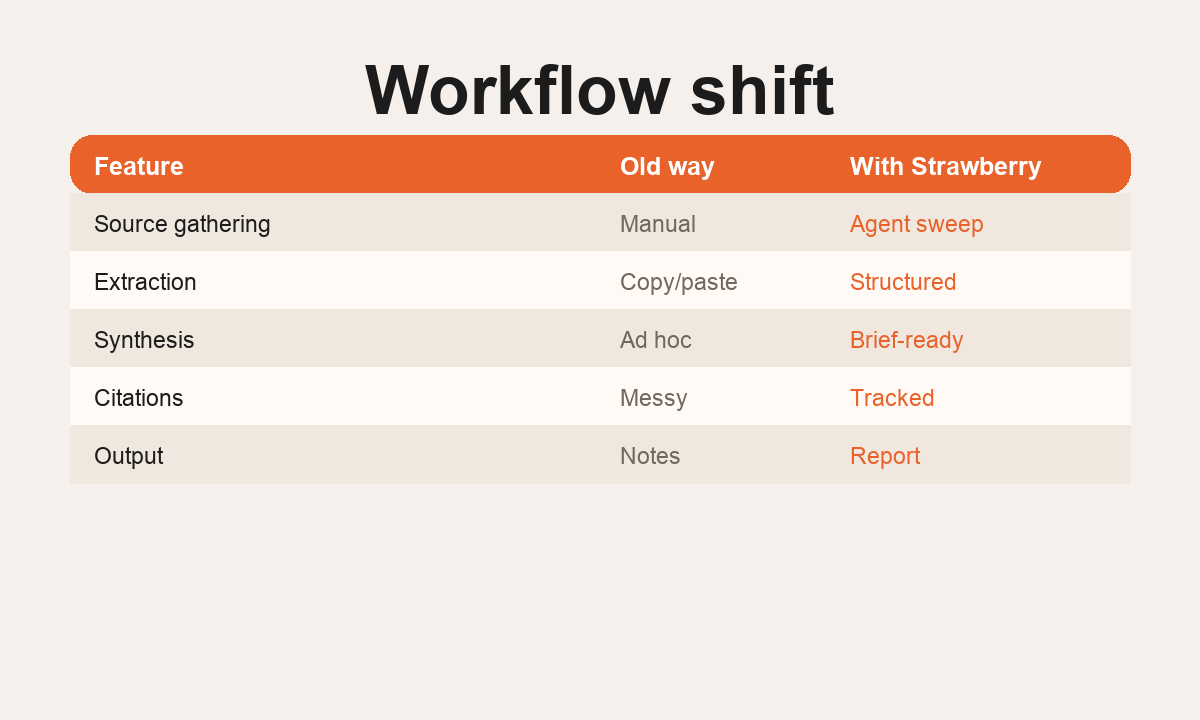
First, map the topic. The agent should search from several angles instead of trusting the first result. For a competitor brief, that might include the company site, docs, pricing, reviews, app marketplace listings, LinkedIn, founder interviews, and recent news.
Second, extract the facts. The agent should pull specific claims, prices, product details, customer segments, limitations, and source links. It should separate what is directly supported from what is inferred.
Third, synthesize. This is where the agent turns a link list into a useful answer. It should compare sources, flag contradictions, identify missing evidence, and explain what the findings mean for the decision.
Fourth, create an output. A good research run should end with something reusable: a brief, table, spreadsheet, call prep note, content outline, CRM note, or slide-ready summary.
Example: competitor research
Instead of asking an AI assistant "summarize this competitor", give a browser agent a specific operating brief:
"Research this competitor's positioning, pricing, target customer, integrations, onboarding flow, customer proof, recent launches, and weaknesses. Use the official site first, then reviews, docs, app marketplaces, social posts, and news. Return a table of claims with source links and a decision memo for our sales team."
That prompt produces a much better output because it defines sources, fields, and the final use case.
Example: account research
For sales, AI research is useful before the first call. A companion can review the company site, recent hiring, current tools, public customer stories, founder posts, and previous email history. The output can be a short call brief with likely pain points, useful demo angles, and questions to ask.
That saves the rep from opening 15 tabs and makes the call feel more relevant without fake personalization.
Example: content research
For SEO and content, the agent can compare search results, identify the real intent behind the keyword, inspect competitor pages, find missing sections, and draft a page that is genuinely more useful. This is especially strong for pages like AI agents for work, AI for agencies, and AI for founders.
What good research output looks like
A useful research deliverable should include:
- The question being answered.
- The sources checked.
- The strongest findings.
- The evidence behind each finding.
- Contradictions or uncertainty.
- What the user should do next.
- A reusable table or brief.
If the output does not support a decision, it is probably just a summary.
Why Strawberry is different
Most AI tools can summarize text pasted into a chat. Strawberry can do the actual research loop inside the browser. It can search, open pages, read connected documents, use app context, write files, and preserve the workflow as a repeatable skill.
That makes it useful for teams that need research every week: founders, sales teams, agencies, recruiters, marketers, investors, analysts, and operators.
The goal is not to replace judgment. The goal is to remove the manual tab work so your judgment starts with a stronger brief.
Workflow pattern
1. Define
Set the goal, source list, fields, and success criteria before the agent starts.
2. Gather
Use browser access, web search, connected apps, and files to collect the right evidence.
3. Structure
Turn messy source material into a brief, table, CSV, CRM note, or repeatable output.
4. Reuse
Save the workflow as a skill or routine so the next run gets faster and more consistent.
How to run this in Strawberry
Start with the output
Tell your companion what final file, table, report, or app update you want.
Name trusted sources
List the websites, apps, folders, tabs, or search angles the agent should check first.
Add guardrails
Decide what the agent can do autonomously and what requires approval.
Save the workflow
When the result is good, turn it into a reusable skill or scheduled routine.
FAQ
Is this the same as using a chatbot?
No. A chatbot mainly answers inside a conversation. A browser agent can work across websites, tabs, connected apps, files, and repeatable workflows.
Does this require engineering work?
No for most workflows. Strawberry is designed for operators who want to use the browser and connected apps directly, then save useful patterns as skills.
What should I automate first?
Start with a task that has a clear input, a repeatable process, and a useful output such as a CSV, brief, report, CRM update, or draft.