AI Agents for Work

A practical guide to AI agents for work: what they are, when to use them, and how teams use browser agents for sales, research, recruiting, marketing, operations, and data extraction.

AI Agents for Work

AI agents for work are AI systems that can plan, use tools, read live information, and complete multi-step tasks inside the software your team already uses. The useful version is not a chatbot that only answers questions. It is a work layer that can move between the browser, apps, documents, spreadsheets, CRMs, inboxes, and internal knowledge.

The simplest way to understand the difference is this: a chatbot helps you think, while a work agent helps you finish. A chatbot can draft a strategy. A browser agent can research companies, open sources, extract the useful fields, write the brief, update the CRM, and prepare the follow-up.

Strawberry Browser is built around this second category. It gives every teammate a personal AI companion that can use the browser, connected apps, files, and repeatable routines. That makes it especially useful for teams where the bottleneck is not one big strategic decision, but hundreds of small admin-heavy workflows.

What an AI agent does at work

A practical work agent combines five capabilities:

  1. Planning - it can break an outcome into steps and keep track of progress.
  2. Tool use - it can call apps like Gmail, Sheets, Calendar, Slack, HubSpot, Salesforce, Linear, GitHub, and internal tools.
  3. Browser control - it can read websites, use logged-in tools, and work with pages that normal APIs do not cover.
  4. Memory - it can remember preferences, company context, known contacts, and repeatable playbooks.
  5. Automation - it can run again on a schedule or when a trigger happens.

The real value comes when these capabilities are combined. A research agent without app access creates a document you still need to copy somewhere. An app integration without reasoning only moves fields around. A browser agent with memory and connected apps can handle the messy middle.

Good use cases for AI agents at work

AI agents work best when a task has clear input, a repeatable process, and a useful output. They are strongest when the work touches multiple tools or sources.

Common examples include:

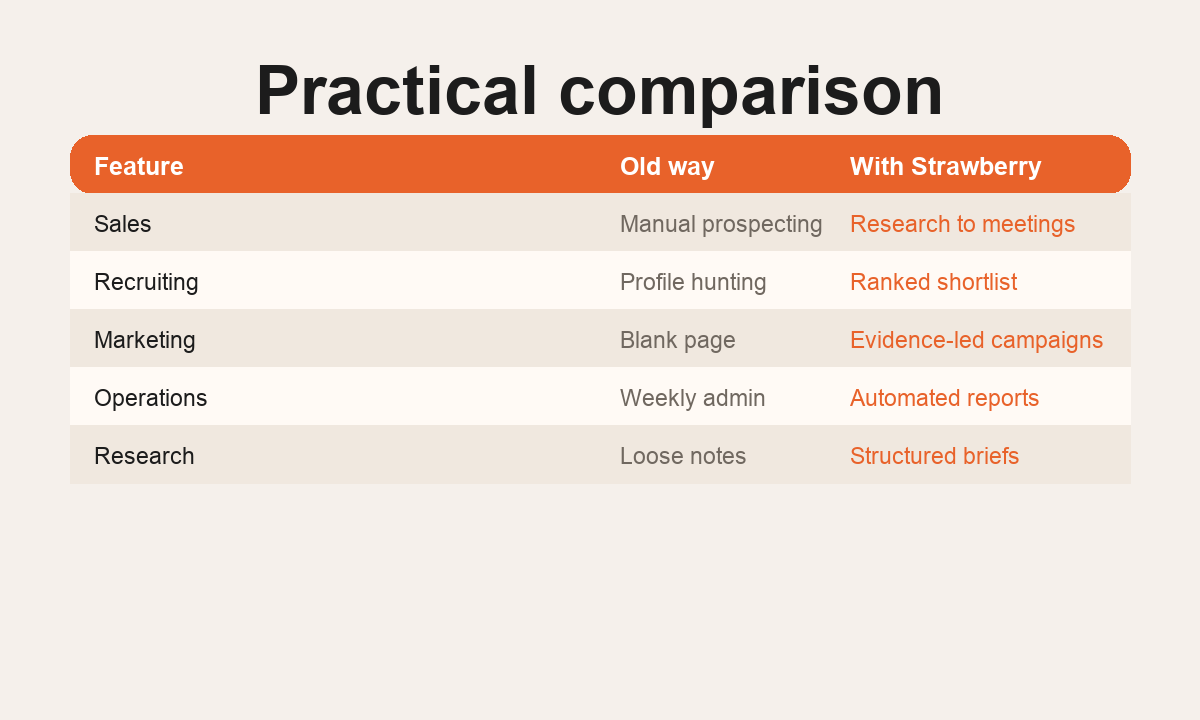
  • Sales teams researching accounts, finding contacts, creating lead lists, and preparing outreach.
  • Recruiting teams sourcing candidates, comparing profiles, and preparing interview briefs.
  • Marketing teams turning competitor research, search trends, and customer conversations into content plans.
  • Operations teams monitoring inboxes, updating records, checking dashboards, and preparing daily summaries.
  • Founders creating investor research, customer lists, market maps, and follow-up materials without hiring extra admin capacity.
  • Agencies producing client reports, prospect lists, campaign audits, and weekly insights at scale.

For more specific workflows, see AI for sales, AI for recruiting, AI for marketing, AI for operations, AI for research, and AI data extraction.

When a browser agent beats a chatbot

A chatbot is useful when the answer mostly lives in the prompt. A browser agent is useful when the answer lives across the internet, your tabs, your apps, and your files.

Use a browser agent when the task requires any of these:

  • Reading multiple live sources before writing.
  • Logging into tools and using existing browser sessions.
  • Moving information between apps.
  • Producing a spreadsheet, CRM update, draft, report, or calendar action.
  • Repeating the same workflow every day or week.
  • Preserving company-specific context between runs.

That is why browser agents are different from generic AI assistants. They are not just better writers. They are better operators.

How to introduce AI agents to a team

The best rollout is not a giant AI transformation project. Start with one painful workflow that already happens every week.

Pick a task where the team can clearly judge quality. Good first candidates are account research, weekly reporting, support triage, meeting prep, candidate sourcing, content research, and data extraction from messy websites.

Then define the agent's operating protocol:

  • What sources should it trust first?
  • Which apps can it read or update?
  • What should it never send or publish without approval?
  • What does a good final output look like?
  • When should it ask for help?

Once the first workflow is reliable, save it as a reusable skill or routine. That is where compounding starts: every finished workflow becomes a template for the next one.

What to avoid

The main mistake is treating AI agents as magic workers with no process. Agents need clear success criteria. They also need guardrails around external actions like sending emails, posting messages, publishing pages, or changing shared systems.

Avoid using agents for vague tasks like "grow revenue" or "fix marketing". Instead, define the operational unit: "find 25 agencies that hired for paid social roles this month, verify emails, create a CSV, and draft first-touch copy".

Also avoid thin automation where the agent only produces a generic paragraph. The output should save actual work: a table, a draft, a decision brief, a report, a CRM update, or a repeatable process.

The bottom line

AI agents for work are most valuable when they operate across tools, not when they sit in a chat box. The highest-impact teams use them for repeatable workflows that combine research, judgment, and admin execution.

Strawberry Browser is designed for that kind of work: open the browser, connect the apps, give the companion context, and turn repeatable work into reusable operating leverage.

AI Agents for Work workflow visual
A structured view of the workflow from manual tabs to agent-powered output.

Workflow pattern

1 Input

1. Define

Set the goal, source list, fields, and success criteria before the agent starts.

2 Sources

2. Gather

Use browser access, web search, connected apps, and files to collect the right evidence.

3 Output

3. Structure

Turn messy source material into a brief, table, CSV, CRM note, or repeatable output.

4 Skill

4. Reuse

Save the workflow as a skill or routine so the next run gets faster and more consistent.

How to run this in Strawberry

  1. Start with the output

    Tell your companion what final file, table, report, or app update you want.

  2. Name trusted sources

    List the websites, apps, folders, tabs, or search angles the agent should check first.

  3. Add guardrails

    Decide what the agent can do autonomously and what requires approval.

  4. Save the workflow

    When the result is good, turn it into a reusable skill or scheduled routine.

FAQ

Is this the same as using a chatbot?

No. A chatbot mainly answers inside a conversation. A browser agent can work across websites, tabs, connected apps, files, and repeatable workflows.

Does this require engineering work?

No for most workflows. Strawberry is designed for operators who want to use the browser and connected apps directly, then save useful patterns as skills.

What should I automate first?

Start with a task that has a clear input, a repeatable process, and a useful output such as a CSV, brief, report, CRM update, or draft.