AI for Recruiting: Source and Screen Candidates Faster

Use AI browser agents to source candidates, summarize profiles, draft outreach, compare fit, and prepare interview briefs.
AI for Recruiting: Source and Screen Candidates Faster

AI for recruiting is most valuable before the interview stage. The bottleneck is usually not writing one job post or summarizing one resume. It is the repeated work of sourcing, screening, comparing, messaging, and preparing context across LinkedIn, ATS records, portfolios, GitHub, company pages, notes, email, and calendars.

A useful recruiting agent should help recruiters move from an open role to a ranked shortlist faster, while keeping the human recruiter in control of judgment, tone, and final decisions.

Strawberry is a strong fit for recruiting workflows because recruiting research happens in the browser. Candidates leave signals across many pages: profiles, portfolios, writing, code, company histories, public talks, and social proof. A browser-native agent can gather that context, structure it, and turn it into a useful recruiting output.

Where AI helps in recruiting

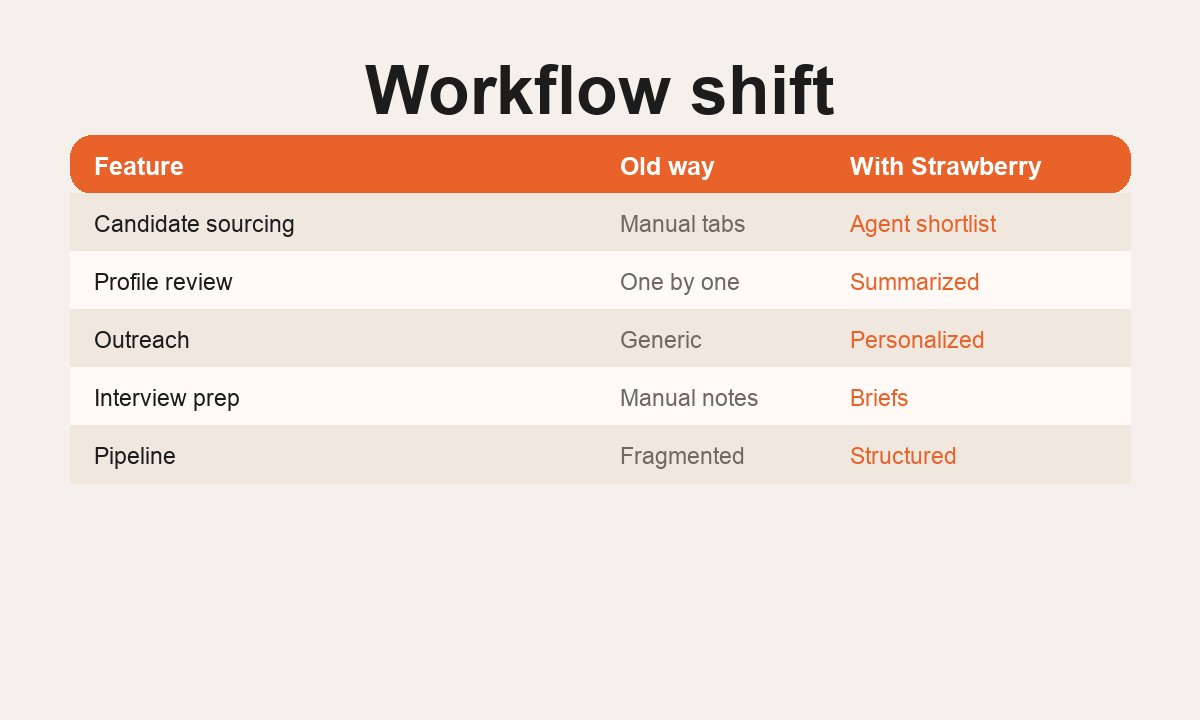
The best recruiting use cases are operational and repeatable: sourcing candidates from LinkedIn, company team pages, GitHub, communities, conference pages, job-change signals, or competitor companies; comparing candidate profiles against role requirements; summarizing relevant experience, strengths, risks, and open questions; building a shortlist with evidence; drafting outreach; preparing interview briefs; and keeping ATS or spreadsheet records consistent.

The goal is not to let the agent make the hiring decision. The goal is to reduce manual research and make the recruiter's decision easier to audit. A good workflow separates evidence from interpretation and marks missing data clearly.

A practical Strawberry recruiting workflow

Find 20 senior growth operators in Copenhagen and Stockholm who have worked at B2B SaaS companies. Include profile URL, current role, relevant experience, evidence, concerns, confidence, and recommended outreach angle.

The important part is structure. A recruiting workflow should include evidence and confidence, not only a score. It should also list what is missing, such as unavailable email, unclear seniority, or weak proof of fit. That protects the recruiter from acting on a polished but unsupported summary.

What to automate first

Start with lower-risk research and preparation work: candidate sourcing, profile summaries, shortlist comparison, outreach drafts, and interview prep. These tasks reduce admin while keeping humans responsible for judgment.

Avoid automating rejection decisions, sensitive evaluations, or claims about a candidate that are not directly supported by sources. Do not infer private information. Do not hide uncertainty inside a score.

What good output looks like

Good AI recruiting output is structured for human review: name, role, company, location, profile URL, evidence for fit, concerns, missing data, recommended next action, and confidence level. Outreach should be clearly marked as a draft.

The best outputs are easy to compare. Use one row per candidate. Keep evidence short but specific. Add questions for the first screen. Put candidates with weak evidence in a separate section instead of mixing them with strong fits.

How to measure it

Measure sourced candidates reviewed, qualified candidates added, time saved per shortlist, response quality, and recruiter confidence. Do not optimize for the number of names alone. A small list with evidence is more useful than a large list with weak fit.

Why browser-native matters

Recruiting research is not contained in one system. ATS records, LinkedIn, portfolio sites, GitHub, personal websites, company pages, and email threads all matter. A browser agent can work where those signals already are, then package the result into a shortlist, table, or interview brief.

Related Strawberry workflows

For adjacent workflows, read Browser Agents for Recruiting Teams, AI for Meeting Prep, AI for Research, and AI Data Extraction.

FAQ

Can AI decide who to hire? No. It should support sourcing, summarizing, and preparation. Humans should make hiring decisions.

How do you keep candidate research accurate? Require source links, confidence, and missing-data fields. Review a sample before scaling.

What is the first recruiting workflow to try? Candidate sourcing into a structured table is usually the safest starting point.

Common mistakes to avoid

The easiest mistake is letting AI turn a vague role description into a vague candidate list. Recruiting workflows need crisp inputs: location, seniority, must-have experience, exclusion criteria, target companies, and examples of strong profiles. Without those constraints, the agent may produce names that look plausible but do not actually match the hiring need.

Another mistake is collapsing evidence into a score. A score can be helpful, but only if the recruiter can see why it exists. Keep the evidence visible: which company, which project, which skill, which public source, and which concern. If the profile is thin, say that it is thin. If the candidate may be strong but the source is weak, separate that from confirmed fit.

When this workflow is ready to scale

Scale recruiting workflows after a sample shortlist has been reviewed by the recruiter or hiring manager. A strong sample should have low duplication, clear fit explanations, useful concerns, and outreach angles that feel specific without becoming creepy. Once the sample works, the same pattern can run for more markets, competitor companies, or role variants.

How teams should use the result

Use the shortlist as a preparation layer, not a final verdict. The recruiter can decide who to contact, which notes to add to the ATS, and what to ask in the first screen. The agent should make the first review faster and better documented.

A review checklist before outreach

Before using a candidate list, check four things: the profile matches the role, the evidence is recent, the outreach angle is based on public professional context, and the next action is appropriate. This keeps the workflow practical and respectful.

AI recruiting workflow map

1 Input

Role criteria

Must-have skills, location, seniority, target companies, and constraints.

2 Sources

Candidate research

Profiles, portfolios, GitHub, company pages, notes, and public evidence.

3 Output

Shortlist

Ranked table with evidence, confidence, missing data, and next action.

4 Decision

Recruiter review

Human reviews fit, tone, fairness, and outreach before acting.

Start with a safe recruiting agent workflow

  1. Define the role tightly

    Write must-have criteria and exclusion rules before sourcing.

  2. Ask for evidence

    Require URLs and notes explaining why each candidate fits.

  3. Flag uncertainty

    Make the agent separate missing data from low confidence.

  4. Keep decisions human

    Use the agent for research and drafts, not final hiring decisions.

ai for recruiting product-led Strawberry visual
Product-led visual for the workflow described above.

Copy this recruiting prompt

Source 10 candidates for [role] in [market]. Return name, current role, profile URL, evidence for fit, missing data, confidence, and suggested next action. Do not infer private information or make hiring decisions.

Use this for a first sample shortlist.

FAQ

What recruiting work should AI handle first?

Sourcing, profile summaries, evidence-backed shortlists, outreach drafts, and interview prep.

What should AI avoid in recruiting?

Final hiring decisions, unsupported claims, sensitive inferences, and automated rejection decisions.

Why use Strawberry for recruiting?

Recruiting signals live across browser tabs and tools, so a browser-native agent can gather context and structure it for review.