Browser Agents for Recruiting Teams
A practical guide to using browser agents for candidate sourcing, profile research, interview preparation, ATS work, and recruiting follow-up.
The short answer
Browser agents help recruiting teams with the research-heavy work around hiring: sourcing candidates, reviewing profiles, comparing portfolios, drafting outreach, preparing interview briefs, and keeping the ATS clean.
They are not just resume screeners. The biggest value is the work recruiters do across browser tabs before a candidate ever enters a formal process.
A browser-agent recruiting workflow
Define the candidate pattern
Role, seniority, location, industry background, tools, portfolio signals, and must-have evidence.
Research across sources
Read LinkedIn, portfolios, GitHub, company pages, ATS context, and relevant public work.
Create the candidate brief
Summarize strengths, gaps, fit, suggested outreach angle, and interview questions.
Update the hiring workflow
Log notes, create follow-up tasks, and prepare the next message or interview pack.
Why recruiting fits browser agents
Recruiting context is fragmented. A hiring team might need LinkedIn, GitHub, portfolios, company websites, ATS records, email threads, calendars, notes, and compensation context to make one good decision.
A browser agent can move across that context and produce a structured output instead of leaving a recruiter with a pile of tabs.
Best recruiting workflows for browser agents
Candidate sourcing
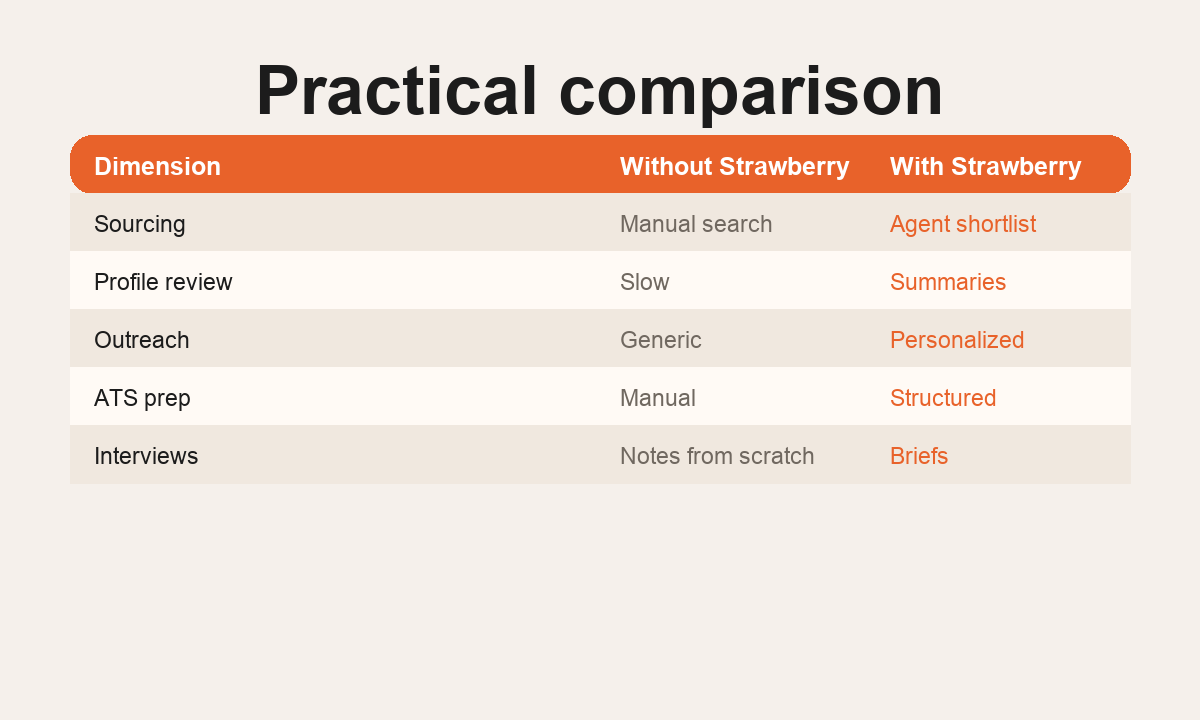
A browser agent can help turn an ICP into a candidate list: role, location, company background, portfolio signals, public work, and likely fit.
Profile summaries
Instead of pasting a profile into a chatbot, the agent can read several sources and produce a compact candidate brief: current role, relevant experience, strengths, gaps, and why they might match the open role.
Outreach drafts
Recruiting outreach works best when it is direct and specific. The agent can identify one real reason the role may fit and draft a short message without fake praise.
Interview preparation
Before an interview, the agent can prepare a brief for the hiring manager: resume highlights, public portfolio notes, open questions, and suggested areas to probe.
ATS and follow-up hygiene
After sourcing or interviews, the agent can update records, create tasks, draft follow-ups, and keep hiring work moving.
What the agent should produce
Evidence
Relevant experience, public work, company background, and role-specific proof.
Judgment
Strengths, gaps, suggested outreach angle, and questions for the hiring team.
Action
ATS notes, follow-up task, outreach draft, or interview prep pack.
Implementation pattern
Start with one role and one output. For example: find 20 candidates, summarize the top 10, and prepare a hiring manager brief. Keep humans in charge of final judgment, sensitive messaging, and hiring decisions.
Related reading
Bottom line
Browser agents are valuable for recruiting because hiring work is browser work: searching, reading, comparing, summarizing, drafting, logging, and following up.
FAQ
Are browser agents the same as resume screening AI?
No. Resume screening is one narrow workflow. Browser agents are more useful for sourcing, research, briefs, outreach, and ATS operations.
What should recruiting teams automate first?
Start with candidate research briefs or hiring manager prep because the output is easy to inspect and saves time immediately.
Can Strawberry work with recruiting tools?
Yes. Strawberry can use connected apps and browser context, which makes it useful around ATS, email, calendars, spreadsheets, and candidate pages.