Browser Agents for Sales Teams
A practical guide to using browser agents for sales research, prospecting, account qualification, CRM hygiene, and meeting prep.
The short answer
Browser agents help sales teams automate the work around selling, not just the act of writing outreach. They can research accounts, inspect websites, summarize prospects, find triggers, prepare CRM updates, draft emails, and create meeting briefs.
A chatbot can help with words. A browser agent can help with the workflow that happens before the words are ready.
A browser-agent sales workflow
Find the account signal
Look for funding, hiring, expansion, new campaigns, public complaints, or operational bottlenecks.
Research the account
Read the website, product pages, roles, CRM record, emails, and relevant public pages.
Create the sales brief
Summarize why now, who to contact, what pain to lead with, and what Strawberry can do for them.
Draft and log the next step
Prepare outreach, update CRM, and create the follow-up task so the workflow is not lost.
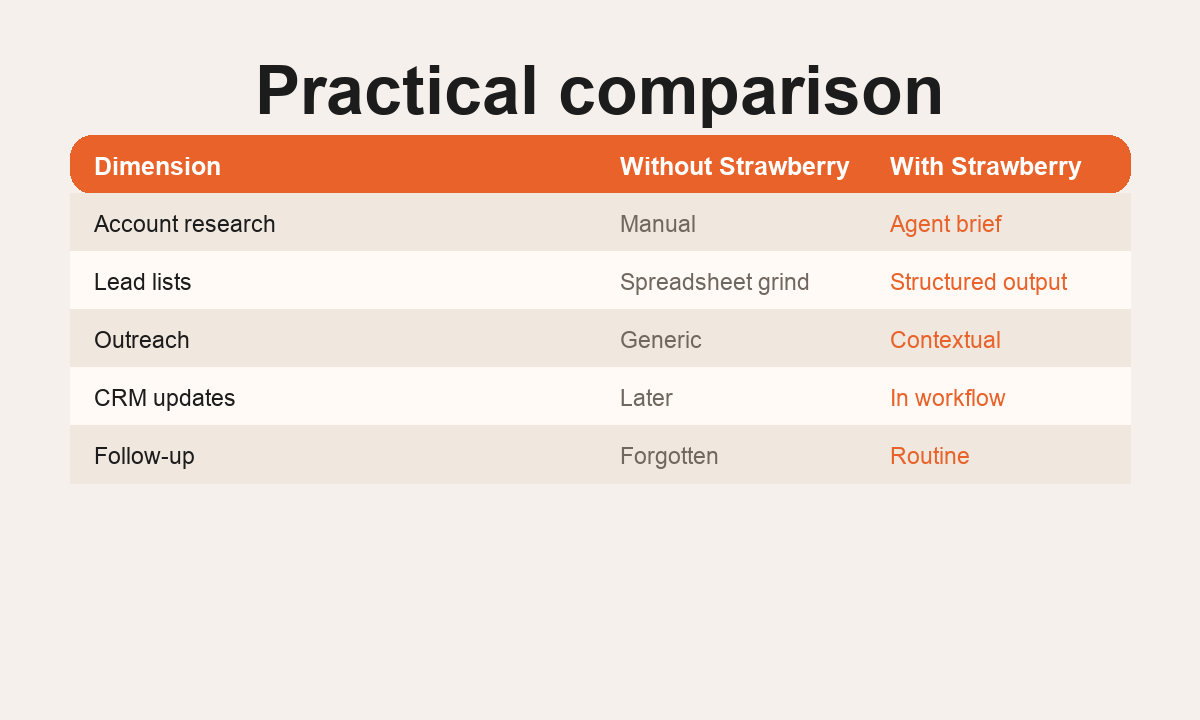
Why sales teams need browser agents
Modern sales work is scattered. A rep might open LinkedIn, a company website, a CRM record, a funding announcement, a job post, a Google Sheet, an inbox thread, and a calendar invite before writing one good message.
That scattered context is exactly where browser agents are useful. They can move across tabs, read pages, use connected apps, and turn research into a concrete output.
Best sales workflows for browser agents
Account research
A browser agent can inspect a target company's website, pricing, hiring signals, product pages, recent news, and CRM history. The output should not be a long generic company summary. It should be a short sales brief: why now, who to contact, what pain to lead with, and what Strawberry can do for them.
Trigger-based lead lists
Instead of starting with a static database export, teams can ask for leads based on a trigger: new hiring, expansion, funding, a new market, a campaign launch, a bad support process, or a visible operational bottleneck.
Personalized outreach drafts
The agent should not fake personalization. The right workflow is to find one real reason the company might care, write a direct message, and keep the CTA low pressure.
Meeting preparation
Before a call, a browser agent can read the prospect's website, CRM notes, calendar context, LinkedIn profile, and recent emails. The output is a call brief with a suggested opener, likely use cases, and the exact proof-of-value to show.
CRM hygiene
After a call or outreach batch, the agent can update CRM fields, add notes, create follow-up tasks, and reconcile missing company data.
What the agent should produce
Signal
A concrete trigger or reason the account is worth contacting.
Angle
A specific workflow Strawberry can run for this buyer.
Output
A brief, draft, CRM update, task, or call plan that moves the deal forward.
Implementation pattern
Start narrow. Pick one high-friction workflow, define the exact output, and run it repeatedly. Good starting points are account briefs for target accounts, meeting prep for tomorrow's calls, or CRM cleanup after demos. Once the output is reliable, turn it into a repeatable companion workflow or routine.
Related reading
Bottom line
Browser agents are useful for sales when they produce pipeline-ready work: researched accounts, sharper outreach, better meeting prep, cleaner CRM data, and faster follow-up.
FAQ
Can a browser agent replace a sales engagement tool?
No. It is better seen as the research and operations layer around the sales stack.
What should sales teams automate first?
Start with account research or meeting prep because both have clear inputs, clear outputs, and immediate quality impact.
Does Strawberry send outreach automatically?
It can prepare and help run outreach workflows, but important external actions should stay under human approval.