Best AI Browsers for Work in 2026
A practical guide to the best AI browsers for work, comparing Strawberry, Dia, Perplexity Comet, OpenAI Operator, and other browser-native agents.
Best AI Browsers for Work in 2026
The best AI browser for work is not simply the browser with the most impressive chatbot. It is the browser that can understand what is on your screen, use the tools where your work happens, and turn messy browser tasks into finished outputs.
That distinction matters because work is no longer contained in one app. A typical operator, founder, recruiter, marketer, or salesperson moves between email, calendar, CRM, spreadsheets, docs, dashboards, social profiles, directories, search results, and internal tools. The browser is already the operating system for that work. AI browsers are the next layer on top.
What is an AI browser?
An AI browser is a browser that includes AI as a native part of the browsing experience. The basic version helps you summarize pages, ask questions, and write while browsing. The more advanced version can take action across tabs, connected apps, files, and workflows.
For work use cases, the second version matters more. A browser that only summarizes a page is helpful. A browser that can research, extract, update, draft, monitor, and repeat workflows is operational leverage.
The main AI browser categories
There are several types of AI browsers emerging:
- Sidebar AI browsers - browsers that add chat next to the page.
- Answer browsers - browsers optimized for AI search and source-backed answers.
- Agentic browsers - browsers where AI can operate tabs and complete multi-step tasks.
- Work browsers - browsers connected to apps, files, memory, routines, and team workflows.
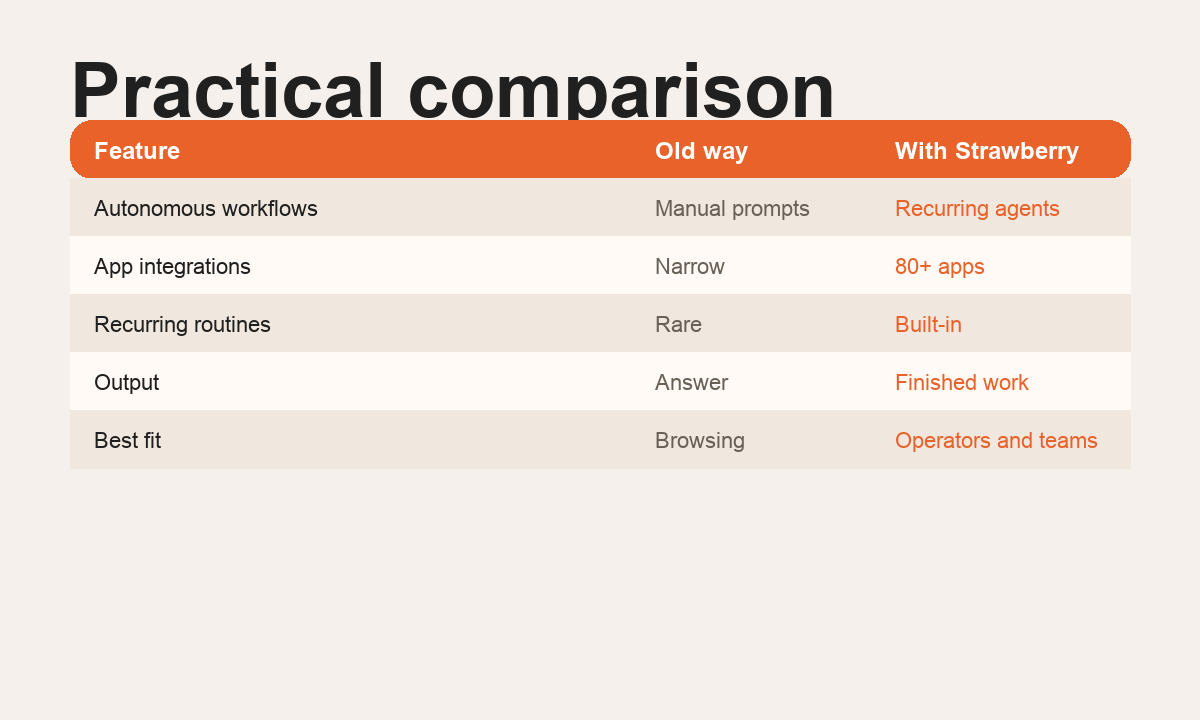
Strawberry is built for the fourth category: work execution.
How to evaluate an AI browser for work
Use these criteria:
- Can it see the actual page and current browser context?
- Can it use connected apps like Gmail, Calendar, Sheets, Slack, CRM, docs, and project tools?
- Can it produce useful outputs like CSVs, reports, briefs, CRM notes, and drafts?
- Can it remember your preferences, active projects, and workflow rules?
- Can it run repeatable routines instead of only one-off chats?
- Can teams reuse workflows through skills, companions, or shared context?
- Does it ask for approval before sensitive external actions?
A good AI browser should not only make browsing feel smarter. It should reduce admin work.
Strawberry Browser
Strawberry is a browser with built-in AI companions. A companion can use the browser, connected apps, files, memory, skills, and routines. That makes Strawberry strongest for workflow-heavy work: sales research, recruiting sourcing, marketing research, operations briefings, data extraction, and recurring admin.
Examples include:
- Find target accounts, research triggers, and create a sales CSV.
- Source candidates and prepare a ranked shortlist.
- Turn web pages into structured tables.
- Create meeting briefs from calendar, email, CRM, and web research.
- Monitor support, competitors, or news on a schedule.
- Save a successful workflow as a reusable skill.
Strawberry is best for people who want an AI operator inside the browser, not just an assistant next to it.
Dia
Dia is an AI browser focused on a polished browsing experience with AI close to the page. It is interesting for users who want a more AI-native personal browser and page-aware assistance.
Dia may be a good fit if the main job is browsing with contextual help. Strawberry is a better fit if the main job is completing operational workflows across browser tabs and apps.
Read more in Strawberry vs Dia.
Perplexity Comet
Perplexity Comet is best understood as an answer and research-oriented browser. Perplexity is strong at source-backed answers and fast exploration of topics.
Comet may be a good fit when the user primarily wants AI search and research while browsing. Strawberry is stronger when the user wants work execution across tools and recurring workflows.
Read more in Strawberry vs Perplexity Comet.
OpenAI Operator
OpenAI Operator helped popularize the idea of agents that can use browser-like environments. It is useful as a general demonstration of AI task execution.
Strawberry differs because it is browser-native and built around ongoing work context: your tabs, connected apps, files, memory, skills, and routines.
Read more in Strawberry vs OpenAI Operator.
Best AI browser by use case
- Sales teams: Strawberry, because sales work spans account research, CRM, email, calendar, and spreadsheets. See AI for Sales.
- Recruiting teams: Strawberry, because sourcing and screening require browser research across profiles, portfolios, ATS notes, and outreach. See AI for Recruiting.
- Marketing teams: Strawberry, because competitor research, customer insight, content operations, and campaign planning are browser-heavy. See AI for Marketing.
- Operations teams: Strawberry, because ops work depends on inboxes, dashboards, admin panels, recurring reports, and task reconciliation. See AI for Operations.
- Research-heavy users: Comet-style products can be strong for answers, while Strawberry is stronger when research needs to become a file, brief, table, or recurring workflow.
The bottom line
The AI browser category will not be won by the prettiest sidebar. It will be won by the browser that turns messy web work into finished outputs.
If your primary need is answers while browsing, an AI search browser may be enough. If your primary need is getting work done across tabs, apps, files, and routines, Strawberry is built for that job.
Next, read What Is an Agentic Browser?, AI Agents for Work, and Browser Agents vs Chatbots.