AI for Operations: Reports, Monitoring, and Admin Work

Use AI browser agents to automate weekly reporting, vendor research, inbox triage, dashboards, and recurring operations workflows.
AI for Operations: Reports, Monitoring, and Admin Work

AI for operations is about removing the repetitive coordination work that sits between tools. Operators spend their days checking inboxes, dashboards, spreadsheets, internal admin panels, calendars, CRM records, support queues, billing tools, and project trackers. The work is rarely hard because of one single task. It is hard because everything is fragmented.

A useful operations agent should monitor, summarize, update, escalate, and prepare outputs without forcing the operator to copy information between systems. It should also know which actions are safe to take directly and which require human review.

Strawberry is designed for this kind of operational work because it can use the browser, connected apps, files, and routines. That means an operations workflow can start from a dashboard, pull context from email, update a sheet, draft a reply, and log a note in the CRM.

Where AI helps operations teams

Operations teams can use AI agents for:

  • Morning briefings from inbox, calendar, CRM, tasks, and dashboards.
  • Support triage and bug categorization.
  • Billing checks, cancellation workflows, and refund preparation.
  • CRM hygiene and missing-field cleanup.
  • Weekly reporting from dashboards and spreadsheets.
  • Vendor or integration monitoring.
  • Internal task follow-up and escalation summaries.
  • Meeting prep and follow-up task creation.
  • Churn save outreach and winback tracking.
  • End-of-day audits across CRM, outreach, and inboxes.

These workflows have clear inputs and useful outputs, which makes them good candidates for agent work. They also benefit from running on a schedule instead of being kicked off manually each time.

Example: daily operating brief

A founder or operator can ask Strawberry to scan the last 18 hours of email, identify urgent support issues, check the day's meetings, pull open CRM tasks with phone numbers, summarize new outreach replies, and write a concise morning briefing. The brief lands in chat before the day starts, with links back to the original threads and records.

That workflow touches multiple tools, requires judgment, and produces a useful output. It is exactly the kind of admin work that should not consume the operator's morning. Running it as a scheduled routine means it happens whether someone remembered to ask or not.

Why browser-native matters

Many operations tools are not cleanly integrated. Some are internal dashboards. Some are admin consoles. Some require logged-in browser sessions. Some expose partial APIs but still need context from the page.

A browser-native agent can combine direct app integrations with browser control. That gives it more coverage than a pure API automation tool and more operational context than a standalone chatbot. Strawberry can also remember team operating protocols across sessions, so the same workflow keeps following the same rules.

What to automate first

Start with recurring work that already has a pattern:

  1. Daily operating briefing.
  2. Weekly reporting.
  3. Support triage.
  4. CRM cleanup.
  5. Billing/cancellation review.
  6. Vendor monitoring.
  7. Task reconciliation.
  8. End-of-day audit.

Do not start with "run operations." Start with one workflow that currently takes 30-90 minutes and has a clear definition of done. Get it reliable, then save it as a skill or routine so the next run is faster and more consistent.

How Strawberry fits

Strawberry companions can remember operating protocols, read team context, use connected apps, browse internal admin tools, and run on schedules. Once a workflow is reliable, it can be saved as a skill or routine so the next run is faster and more consistent across the team.

For related workflows, read AI for CRM Hygiene, AI for Customer Support, AI for Meeting Prep, AI Agents for Work, and Browser Agents vs Chatbots.

Common operations workflows in Strawberry

A practical operations companion should run specific workflows, not vague instructions. Examples include:

  • Morning briefing: unread important emails, calendar events, urgent support issues, CRM tasks, and yesterday's open loops.
  • Support triage: classify tickets, check source-of-truth docs, identify product bugs, draft or send replies according to policy, and log feedback.
  • Billing review: inspect cancellation requests, plan state, payment history, refunds, and credit grants before proposing an action.
  • CRM reconciliation: find missing contacts, stale opportunities, orphan notes, overdue tasks, and unlinked replies.
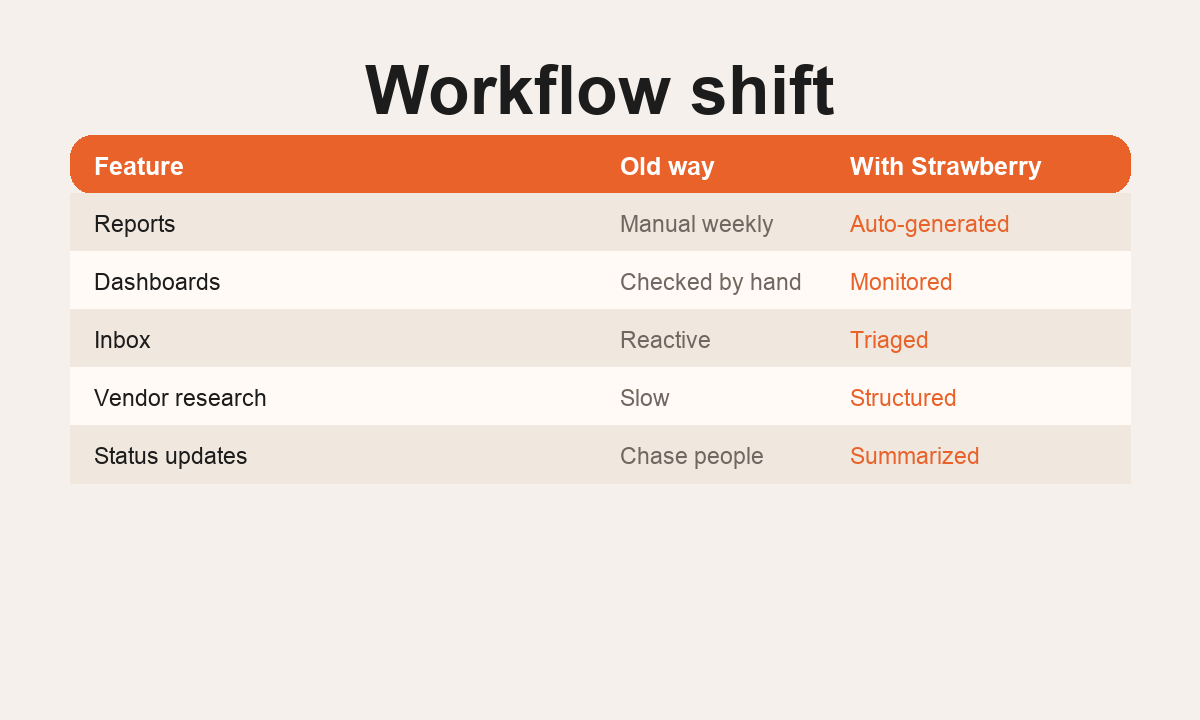
  • Weekly reporting: collect dashboards, summarize changes, highlight blockers, and propose next actions.
  • Churn save: find users who cancelled or downgraded last week, segment by usage, and prepare a personalized winback message.

The best operations agents are boring in the right way. They follow the same checklist every time, surface exceptions, and leave an audit trail.

Guardrails for operations agents

Operations work often touches sensitive systems. A good agent needs clear rules around what it can do directly and what requires approval. Reading context, preparing reports, creating drafts, and updating internal trackers are usually safe. Sending external messages, issuing refunds, granting credits, deleting records, or changing permissions should follow explicit company policy.

Strawberry supports that operating model because companions can keep written protocols in memory and skills. The workflow gets better over time instead of resetting every chat. That is what turns a one-off "do this for me" prompt into a repeatable operating procedure that the whole team can rely on.

Bottom line

AI for operations is not about replacing operators. It is about giving them leverage across the scattered tools where the company actually runs. Strawberry helps by turning repeated browser admin work into repeatable workflows, briefings, reports, and routines.

The operations agent loop

1 Triggers

Listen

Schedule, webhook, or chat request kicks off the workflow.

2 Apps + tabs

Gather

Read email, calendar, CRM, dashboards, and internal admin tools.

3 Protocol

Decide

Compare against written operating rules in memory and skills.

4 Drafts or sends

Act

Update tracker, draft reply, send message, log note, or escalate.

5 Audit trail

Report

Summarize what changed and leave links back to source.

Roll out an operations agent in five steps

  1. Pick one painful 30-90 minute workflow

    Choose a recurring task with clear inputs and a clear definition of done. Daily briefing, support triage, and weekly reporting are good starting points.

  2. Write the operating protocol

    Document the rules in plain language: where to look, what to count as urgent, when to draft vs send, when to escalate. This becomes the companion's memory or skill.

  3. Connect the right apps and tabs

    Give the companion access to the tools the workflow needs: Gmail, Calendar, the CRM, support console, dashboards. Pre-open any internal tabs that require a login.

  4. Run it manually a few times

    Have the companion run the workflow end-to-end in chat. Correct the rules, add edge cases, and tighten the output format before scheduling.

  5. Promote to a routine

    Once the output is consistent, schedule it. The same prompt now runs daily or weekly and writes results to a file, a doc, or a notification.

What a real ops companion uses

Gmail and Outlook

Read unread threads, classify, draft replies, send when authorized.

Triage queue and draft folder

Google Calendar

Pull today and tomorrow's meetings, flag missing RSVPs and conflicts.

Daily meeting list

CRM (Twenty, HubSpot, Salesforce)

Update stages, log notes, create tasks, link replies to records.

Up-to-date pipeline

Support console

Read tickets, propose credit grants, draft replies, escalate bugs.

Resolved or escalated tickets

Sheets, Docs, files

Write reports, briefings, audit logs, and lead lists.

Shareable artifacts

Browser tabs

Use internal admin tools and dashboards that have no API.

Pulled metrics and screenshots

Routines and skills

Run the workflow on a schedule and keep the protocol in memory.

Repeatable operating procedure
AI for Operations workflow: apps, tabs, files, routines, audit trail.
How an operations companion turns scattered admin work into one repeatable loop.

AI for operations FAQ

Can Strawberry replace our operations team?

No. Strawberry is a leverage tool. It removes the repetitive coordination work between tools so operators can spend their time on judgment calls, customer conversations, and process design.

What workflows should we automate first?

Start with recurring workflows that take 30-90 minutes and have a clear definition of done. Daily briefings, support triage, weekly reporting, and CRM cleanup are reliable first targets.

How do we keep the agent from making mistakes on sensitive actions?

Separate read and write authority. Reading, summarizing, and drafting are usually safe. Sending external messages, issuing refunds, granting credits, or deleting records should follow an explicit written protocol with approval steps.

Do we need to integrate every tool through an API?

No. Strawberry combines direct app integrations with browser control, so it can also operate internal admin panels and dashboards that have no public API. That is one of the main reasons browser-native agents fit operations work.

How does this differ from a workflow tool like Zapier?

Zapier is great for clean, event-driven API automations. Operations work is rarely that clean. Browser agents handle messy, multi-tool, judgment-heavy work that does not fit a fixed trigger-action shape. See Strawberry vs Zapier for a deeper comparison.